What I Use
The hardware, software, tools, and occasionally unnecessary equipment I use to build things.
This isn't a list of recommendations, and it definitely isn't everything I own. It's a snapshot of the things that are actually part of how I work, experiment, and make things today.
It changes frequently. My terminal setup in particular tends to survive only until I get bored with it.
Daily Development
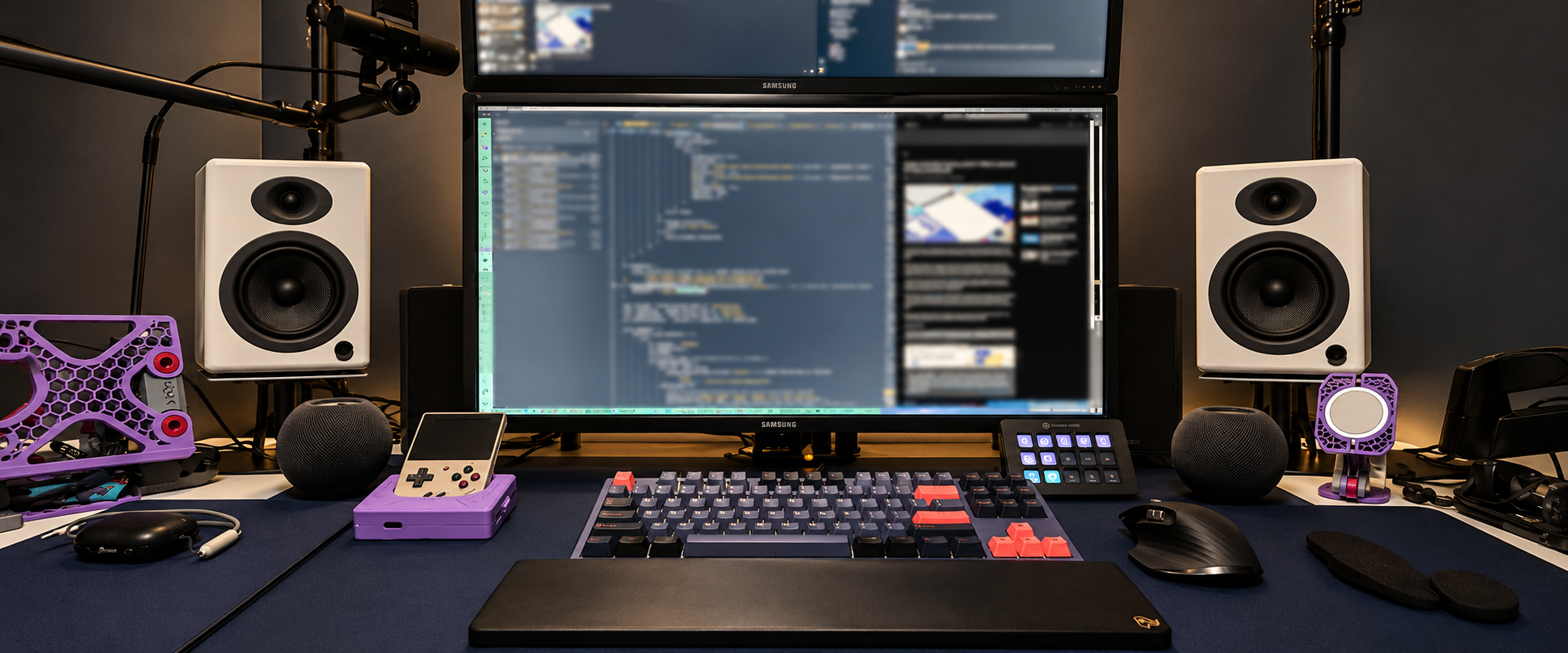
Most days start at the same desk with a MacBook closed underneath two monitors and a terminal open on the screen.
MacBook Pro
16-inch November 2024 MacBook Pro with an M4 Max, 48 GB of RAM, and a 1 TB SSD. It normally stays closed and docked unless I'm working away from my desk.
Displays
Two Samsung 32-inch 4K displays stacked vertically. The bottom display is my actual workspace. The top is usually playing something I'm learning from or whatever TV show has become background noise for the day.
Keyboard & Mouse
Ducky One 3 TKL Cosmic Blue with Cherry MX Blue switches and the RGB set to wave, paired with a Logitech MX Master 3 and DeltaHub Carpio 2.0 wrist rest.
Desk & Chair
A sit/stand desk and Secretlab Titan Evo. I mostly use the adjustable desk to get the height exactly where I want it while sitting with my feet on a cushioned footrest.
Terminal
My terminal setup changes whenever I get bored with it. Right now it's Ghostty, zsh, Oh My Posh, and Herdr, with Claude Code, Codex, and Pi as my primary coding agents.
Audio & Video
Audioengine A5+ powered speakers with a Klipsch 8-inch Reference subwoofer, Elgato Wave:1 on a Wave Mic Arm LP, Logitech Brio 4K, two Elgato Key Lights, a Stream Deck Mk.2, and a Canon EOS M6 Mark II when I want a real camera.
Setting Up a Mac
I try to keep the host machine relatively disposable. On a new Mac I install Homebrew and Chezmoi, point Chezmoi at my dotfiles repository, and let the configuration do most of the boring work.
My keyboard is heavily customized with Karabiner-Elements. Caps Lock acts as a Hyper key, and I use additional layers for window positioning, application launching, and other shortcuts. Magnet does the actual window management underneath those bindings. I even have a script somewhere that generates the Karabiner configuration from simpler rules because apparently configuring the keyboard needed its own tooling.
VS Code is based on a modified version of the Make VS Code Awesome setup, although these days I spend much more time in the terminal than I do in the editor.
AI Lab
I started running more of my own inference after spending hundreds of dollars a month on AI subscriptions and still running into usage limits. Owning the compute also gave me an excuse to learn the parts of the stack that disappear behind a hosted API.
2 × NVIDIA DGX Spark
Two Sparks stacked together, each with its standard 4 TB Gen5 SSD. They're connected directly over ConnectX-7 in addition to their normal network connections.
The pair currently runs DeepSeek V4 Flash Vision through vLLM with tensor parallelism across both machines. The head Spark also runs ComfyUI with Krea 2, Flux, and Z-Image Turbo.
Models and services run in containers so I can experiment without gradually turning the hosts into dependency archaeology projects.
Linux Server
A custom water-cooled Intel Core i9-14900K machine with 64 GB RAM, a 1 TB system SSD, 4 TB working SSD, and an RTX 5060 Ti with 16 GB of VRAM.
It hosts sites through Cloudflare Tunnels, runs the AI gateway, and also has 14 TB of external storage full of movies served through Plex.
Tailscale gives me remote access when I'm away from home.
Cairn
Cairn is the LiteLLM gateway in front of my AI infrastructure. Instead of making every application care about individual models, I organize inference into capability tiers and routers with a mountaineering theme.
Most tiers prefer local or shared-quota inference before escalating toward paid frontier models. Routers such as switchback, traverse, belay, and scramble classify requests and choose a path based on what kind of work is being done.
I use the same idea for image generation, speech recognition, and text-to-speech. None of this is strictly necessary. I could point everything at a frontier API. It's considerably more fun this way.
Software I Actually Use
This is intentionally different from my Stack page. These are the applications and tools I actually reach for regularly.
Development
- Ghostty — Current terminal, until I get bored and change it again
- zsh + Oh My Posh
- Herdr — Terminal multiplexing
- Claude Code
- Codex
- Pi
- VS Code — When I actually want an editor
- Typora — Markdown
Mac
- Homebrew
- Chezmoi — Bootstraps my dotfiles and machine configuration
- Karabiner-Elements — Custom Hyper key and layered keyboard shortcuts
- Magnet — Window management behind my keyboard layers
- 1Password
- Safari
- Chrome
Fabrication
- Bambu Studio — Bambu printers
- Lychee Slicer — SLA printing
- Carbide Create — CNC
- xTool Studio — Lasers and DTF printing
Creative
- Affinity Designer
- Affinity Photo
- Pixelmator Pro
- iMovie — YouTube editing
- OBS — Video capture and a streaming setup I bought before actually becoming a streamer
Workshop & Making
Software is only one way I like to build things. My workshop has gradually accumulated enough fabrication equipment that it has become a small prototyping lab.
Most of it arrived the same way my software projects do: I wanted to make something, didn't have the right tool, bought or built the tool, and then discovered ten other things I could do with it.
3D Printing
- Bambu Lab P1S × 2 — My everyday FDM printers
- LulzBot TAZ 6 — Still hanging around from an earlier generation of my 3D printing habit
- Anycubic Photon M3 — SLA / resin printing
- Anycubic Wash & Cure — Resin post-processing
Lasers
- Glowforge
- xTool D1 Pro 10W — Diode laser
- xTool F1 Ultra — Fiber + diode
CNC
- Carbide 3D Shapeoko 5 Pro
- Inventables X-Carve
- Shapeoko 2 → X-Carve — An older Shapeoko 2 that I eventually upgraded into an X-Carve
Printing & Decoration
- xTool Apparel Printer — Direct-to-film printing
- EufyMake UV Printer
- Sawgrass SG500 — Sublimation printing
- Cricut Maker — Vinyl and cutting
Woodworking
- Delta Table Saw
- Benchtop Planer
- Delta Benchtop Router
- Benchtop Drill Press
- Benchtop Band Saw
- Dust Collection
Sewing & Embroidery
- Brother NS2750D — Computerized sewing and embroidery machine, including the Disney designs
- Brother 1034D — Serger
Sometimes the Tool Is the Project
One of the useful parts of having all of this equipment around is being able to make the tool I need instead of searching for one.
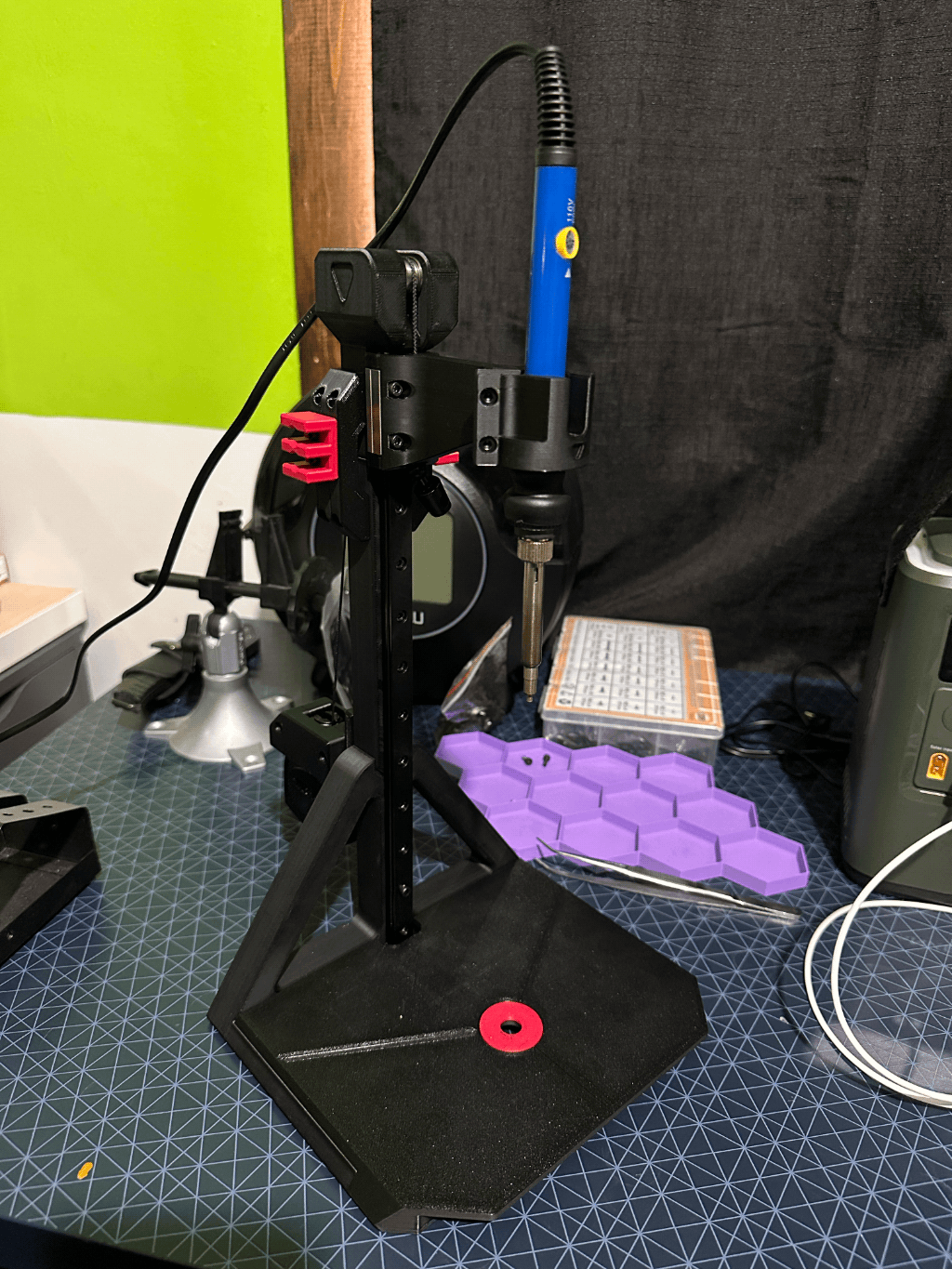
This is a small heat-set insert press I 3D printed for installing threaded inserts into printed parts. It holds a soldering iron vertically so I can press an insert straight into the part instead of trying to keep the iron steady by hand.
That's generally how I use the workshop. The printers make fixtures for the electronics bench. The CNCs and lasers make parts and enclosures. Electronics end up inside things I've fabricated. One capability tends to make the others more useful.
Electronics
At one point I decided I was going to build most of the smart devices in my house myself. The lasting result is that I now own a slightly unreasonable quantity of microcontrollers and electronic components.
Boards
I have ESP8266s, several varieties of ESP32s, Arduino Nanos and Unos, an Arduino Uno Q, Raspberry Pi 4s and 5s, Raspberry Pi Zero 2 Ws, Raspberry Pi Picos, and assorted other boards that have accumulated over the years.
There are also bins of resistors, capacitors, sensors, ICs, modules, and other components that I used to order directly from China in bulk and forget about until they eventually showed up.
Bench
- ATX computer power supply converted into a bench power supply
- Oscilloscope I built from a kit
- Digital microscope
- Inexpensive SMD hot plate for surface-mount work
- Soldering irons
- Breadboards and prototyping equipment
Eventually the Components Got Too Small
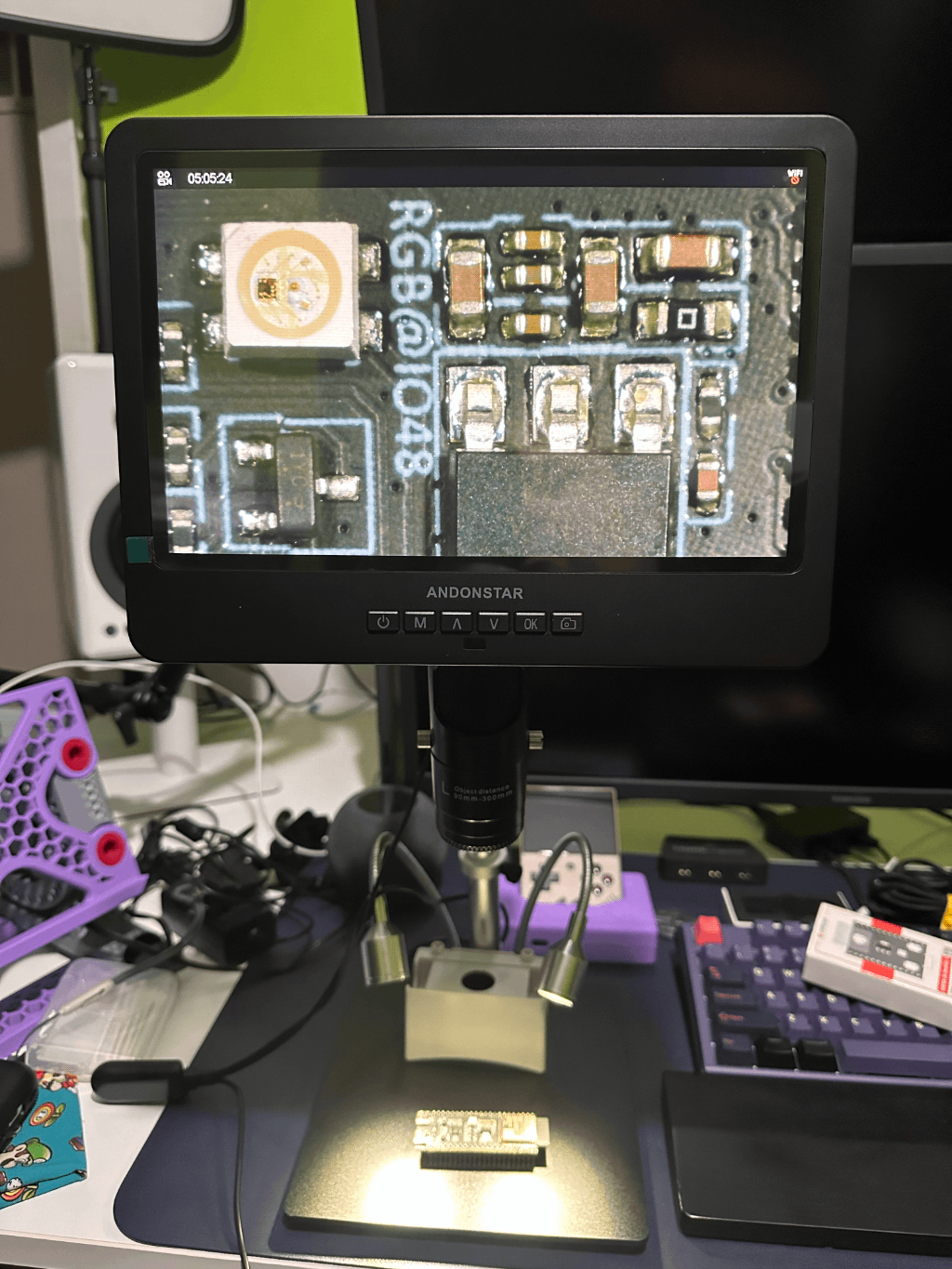
The digital microscope became necessary when I reached the age where surface-mount components became considerably smaller than my eyesight was interested in dealing with.
It's now one of those tools that makes me wonder why I spent so long trying to inspect tiny solder joints without one.
Photography
Photography has been another hobby long enough that I've accumulated a small ecosystem around it too.
Canon EOS 80D
This is normally my go-to camera, although my daughter is currently borrowing it.
Canon EOS M6 Mark II
My smaller mirrorless camera from Canon's discontinued EOS M system. It also occasionally gets pulled into service as part of my desk and video setup.
Canon PIXMA PRO-100
Large-format photo printer for the times when I want a photograph to exist somewhere other than on a screen.
Editing
Affinity Photo and Pixelmator Pro handle most of my photo work, with Affinity Designer around when the job drifts toward graphics instead.
Video
I use iMovie when I edit videos for YouTube and OBS when I need to capture video or a screen.
I also bought the camera, microphone, lights, Stream Deck, and other equipment necessary for streaming. I have not, in fact, actually become a streamer.
This Is a Snapshot
None of this is intended as a buying guide. Some of these are things I'd replace immediately if they broke. Others are still here because they solved a problem at some point and I haven't found a reason to get rid of them.
The software changes. The models change. The terminal definitely changes. New tools appear whenever I find a problem that gives me an excuse to learn how to use one.
The common thread is pretty simple: I like being able to go from I wonder if I can do that to actually trying it without too many things getting in the way.